Automatically Upload Bol.com Invoices to Moneybird
BolMoneybird Team
team@bolmoneybird.nl
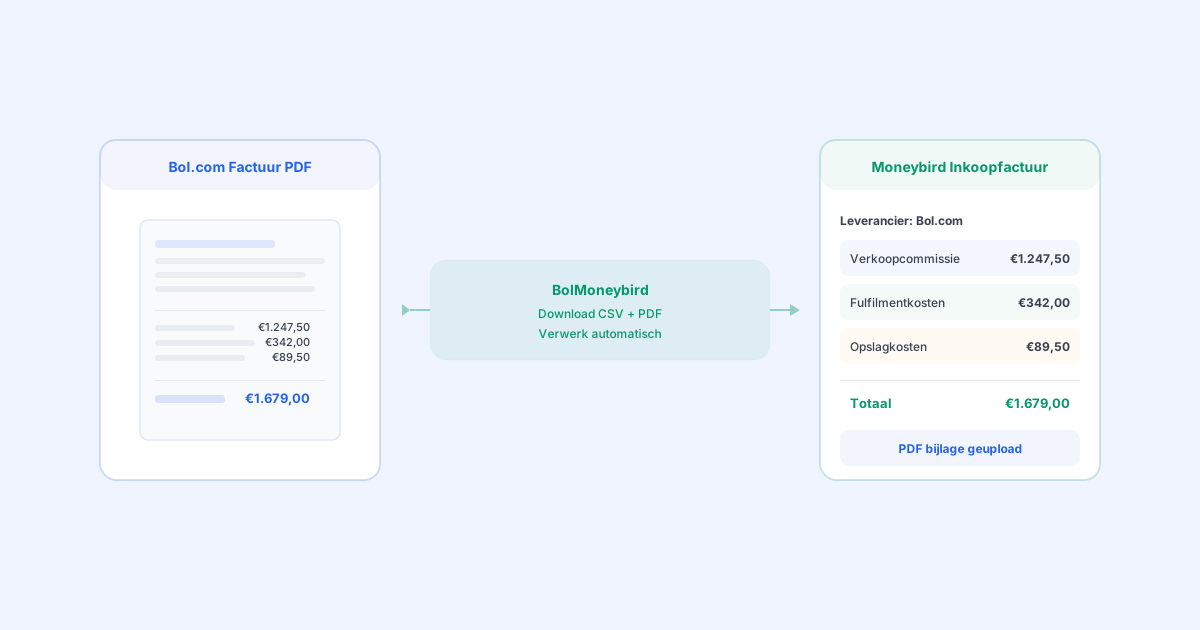
Every month as a Bol.com seller, you receive an invoice with an overview of all costs: sales commissions, fulfillment fees, storage costs, and other charges. This invoice needs to be recorded as a purchase invoice in your Moneybird administration — complete with the correct ledger accounts and the original PDF as an attachment. Doing this manually is a tedious chore. But with BolMoneybird, you can automatically upload Bol.com invoices to Moneybird, including every detail. In this article, we explain how this unique feature works.
The Monthly Bol.com Invoice: What Does It Contain?
Each month, Bol.com compiles an invoice for its sellers. This invoice is available in the seller portal and provides an overview of all financial settlements from the past month.
Components of the Invoice
A typical Bol.com monthly invoice contains the following components:
Sales commissions: the total commission amount that Bol.com has withheld from your sales. Often broken down by commission category or commission rate.
Fulfillment costs (with FBB): if you use Fulfillment by Bol.com, this section lists the costs for handling, packaging, and shipping.
Storage costs (with FBB): the monthly costs for storing your products in the Bol.com warehouse.
Shipping fee compensation: the compensation Bol.com pays for shipping costs on FBR orders.
Corrections and settlements: any corrections to previous invoices, return costs, or other settlements.
Total to be paid out / settled: the net amount that will be paid to you after all settlements, or that you owe Bol.com.
The CSV Specification
In addition to the PDF invoice, Bol.com provides a CSV file with a detailed specification of every line item. This CSV file contains the commission, fulfillment costs, and other charges per order. It is essential for detailed bookkeeping.
Why Is It Important to Book Bol.com Invoices Correctly?
Legal Requirement
As an entrepreneur, you are legally required to record all purchase invoices in your administration. The Bol.com monthly invoice is a purchase invoice (Bol.com provides a service to you) and must therefore be in your accounting records.
VAT Deduction
The Bol.com invoice includes VAT (21%). You can deduct this VAT as input tax on your VAT return. If you don’t book the invoice, you miss out on this deduction and pay more VAT than necessary.
Accurate Cost Reporting
Without the Bol.com invoice in your accounting, you have an incomplete picture of your costs. Your profit appears higher than it actually is, which can lead to poor business decisions.
Audit Readiness
During a tax audit, you need to be able to show all purchase invoices, including the accompanying PDF documents. A complete administration with the original invoice as an attachment is essential.
The Manual Process: 7 Steps Every Month
If you process the Bol.com invoice manually, you go through the following steps each month:
Step 1: Download the Invoice
Log in to the Bol.com seller portal, go to the financial overview, and download the PDF invoice.
Step 2: Download the CSV
Also download the CSV specification for the detailed cost breakdown.
Step 3: Analyze the CSV
Open the CSV file in Excel or Google Sheets. Create an overview of costs by category: sales commission, fulfillment costs, storage costs, and other costs.
Step 4: Create a Purchase Invoice in Moneybird
Go to Purchases > Invoices > New invoice. Select Bol.com as the supplier.
Step 5: Add Line Items
Add a line for each cost category with the correct amount, VAT rate (21%), and the corresponding ledger account.
Step 6: Upload the PDF
Upload the original Bol.com PDF invoice as an attachment to the purchase invoice in Moneybird.
Step 7: Review and Save
Verify that all amounts match the Bol.com invoice. Save the purchase invoice.
This entire process takes an average of 30-60 minutes per month, depending on the complexity of your invoice. And the chance of errors — wrong amounts, wrong ledger accounts, forgotten line items — is considerable.
Automatic Invoice Processing with BolMoneybird
This is where BolMoneybird sets itself apart from other Bol.com-Moneybird integrations. The automatic invoice import is a unique feature that you won’t find anywhere else.
How It Works
BolMoneybird automates the entire process in four steps:
1. Automatic Detection
BolMoneybird monitors your Bol.com account and detects when a new monthly invoice becomes available. You don’t have to do anything — no logging in, no manual checking.
2. Download and Processing
As soon as a new invoice is detected, BolMoneybird downloads:
- The CSV specification with all detailed line items
- The PDF invoice as the original document
The CSV is automatically analyzed and the costs are categorized.
3. Creating the Purchase Invoice in Moneybird
BolMoneybird creates a purchase invoice in Moneybird with:
- Supplier: Bol.com (automatically created as a contact if it doesn’t exist yet)
- Invoice date: the date of the Bol.com invoice
- Invoice number: the Bol.com invoice number as a reference
- Detailed line items: each cost category as a separate line on the correct ledger account
- Sales commissions on the commission expense account
- Fulfillment costs on the FBB expense account
- Storage costs on the storage expense account
- Other costs on the appropriate account
- VAT: correctly calculated per line (21%)
4. PDF as Attachment
The original Bol.com invoice PDF is automatically uploaded as an attachment to the purchase invoice in Moneybird. This way you always have the original document at hand — for your own administration and for any potential tax audit.
The Result
After automatic processing, Moneybird contains a complete, detailed purchase invoice from Bol.com with:
- All costs correctly categorized
- VAT correctly calculated
- Original PDF as an attachment
- Automatic mapping to the correct ledger accounts
And it cost you exactly zero minutes.
Benefits of Automatic Invoice Processing
Time Savings
You save 30-60 minutes per month on manual work. Over a year, that’s 6-12 hours you can spend more productively.
Zero Errors
Automatic processing eliminates human errors. No wrong amounts, no forgotten line items, no incorrect ledger accounts.
Always Complete
You’ll never forget to process a Bol.com invoice again. BolMoneybird detects every new invoice automatically.
Audit-Proof
With the original PDF as an attachment, your administration is always complete for a tax audit. You no longer need to search the Bol.com portal for old invoices.
Real-Time Insight
Because invoices are processed automatically as soon as they become available, you always have an up-to-date picture of your costs.
How Do You Set It Up?
Configuring the automatic invoice import in BolMoneybird is straightforward:
Step 1: Connect Your Bol.com Account
Link your Bol.com seller account to BolMoneybird via the Bol.com API. This gives BolMoneybird access to your invoices.
Step 2: Configure Ledger Accounts
In the BolMoneybird settings, specify which Moneybird ledger accounts you want to use for:
- Sales commissions
- Fulfillment costs
- Storage costs
- Other costs
Step 3: Activate Invoice Import
Enable automatic invoice import in the synchronization settings. BolMoneybird immediately starts monitoring your Bol.com account.
That’s all. From now on, all Bol.com invoices are automatically processed in Moneybird.
Frequently Asked Questions
Are Existing Invoices Also Imported?
On first use, BolMoneybird imports invoices from previous months so that your administration is immediately complete.
What If There’s an Error in the Bol.com Invoice?
If Bol.com issues a correction, it is automatically processed as a new invoice line or correction invoice.
Does This Also Work for Bol.com Belgium?
Yes, invoices for both Bol.com Netherlands and Bol.com Belgium are automatically processed.
Can I Change the Ledger Accounts Later?
Yes, you can adjust the ledger accounts at any time in the BolMoneybird settings. New invoices will then be processed with the updated settings.
Conclusion
Automatically uploading Bol.com invoices to Moneybird is one of the most valuable features of BolMoneybird. It saves you time every month, prevents errors, and ensures your administration is always complete — including the original PDF as an attachment. This is a feature you won’t find in any other Bol.com-Moneybird integration, and it makes a real difference in the efficiency of your bookkeeping. Try BolMoneybird and experience how easy processing Bol.com invoices can be.
Tags
Share