Automate Your Accounting as a Bol.com Seller: The Complete Guide
BolMoneybird Team
team@bolmoneybird.nl

As a Bol.com seller, you know the drill: every day you manually create invoices, copy amounts, check VAT rates, and enter everything into your accounting software. It takes hours every week and the risk of mistakes is high. But what if you could fully automate your Bol.com accounting with software? In this complete guide, you will learn exactly how it works, what you can automate, and how to get started today.
Why Automate Your Accounting as a Bol.com Seller?
Most Bol.com sellers start out doing their bookkeeping manually. With just a few orders per week, that is manageable. But once you grow to dozens or even hundreds of orders per week, manual bookkeeping becomes a time-consuming and error-prone process.
The Problems with Manual Bookkeeping
- Time loss: On average, Bol.com sellers spend 5-8 hours per week on administrative tasks. That is time better spent growing your business.
- Human errors: Wrong amounts, incorrect VAT rates, forgotten credit invoices — manual data entry inevitably leads to mistakes. And accounting errors can have costly consequences during a tax audit.
- Delays: If you only update your records at the end of the month, you have no real-time insight into your financial position. You do not know exactly where you stand in terms of revenue, costs, and profit.
- Scalability: As your sales grow, the administrative burden grows linearly. At some point, it is simply no longer feasible to do everything by hand.
The Benefits of Automation
When you automate your accounting, these problems vanish:
- 90% time savings: What used to take hours now happens automatically in seconds. All you need to do is review instead of manually entering data.
- Error-free results: Automated systems do not make typos. Amounts, VAT rates, and customer details are transferred exactly from Bol.com.
- Real-time insight: Your accounting is always up to date. After every order, you can immediately see the impact on your revenue and costs.
- Scalability: Whether you process 10 or 10,000 orders per month, it takes you the same amount of time (virtually none).
What Can You Automate?
When automating your Bol.com accounting, it is not just about invoices. There are multiple processes you can and should automate.
1. Creating Sales Invoices
Every Bol.com order needs to result in a sales invoice in your accounting system. This includes customer details, product name, quantity, price, shipping costs, and the correct VAT rate. With automation, this invoice is created instantly as soon as the order status changes to “shipped.”
2. Processing Returns as Credit Invoices
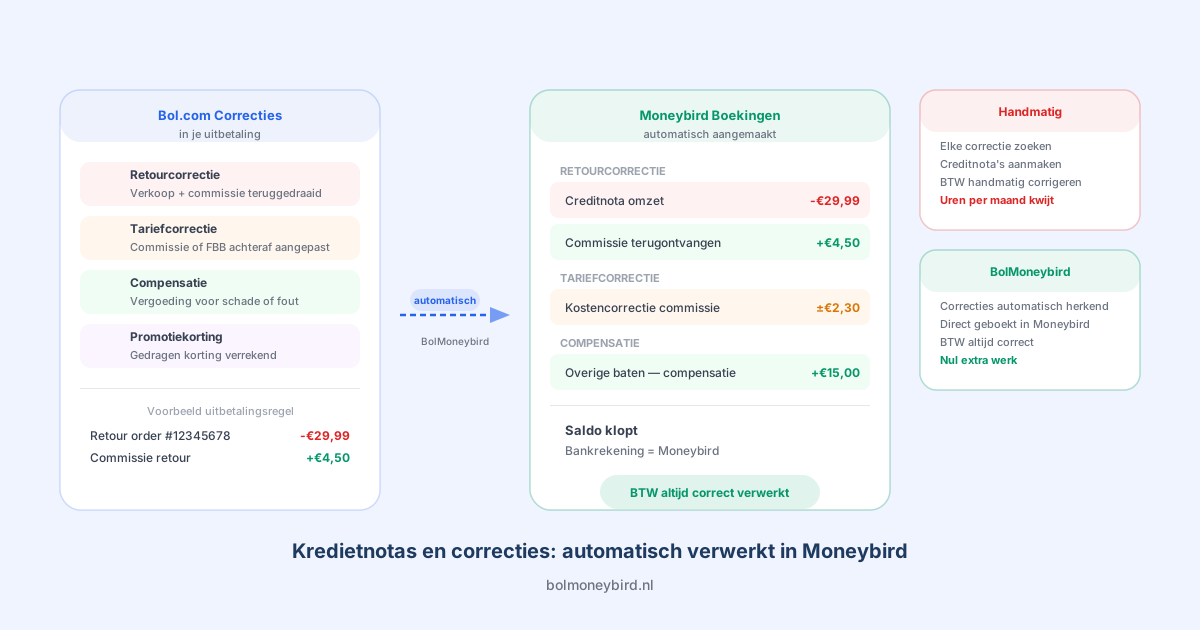
When a customer returns a product, you need to create a credit invoice linked to the original sales invoice. Doing this manually is error-prone — you have to find the right invoice, correctly copy the amounts, and create the credit note. Automation handles all of this for you.
3. Recording Bol.com Commissions
Bol.com charges a commission on every product sold. This commission varies by product category (from 5% to over 20%). These costs need to appear as purchase invoices in your accounting. Automation ensures that every commission is recorded correctly.
4. Importing Bol.com Monthly Invoices
Each month, you receive an invoice from Bol.com with an overview of all commissions, shipping costs, and other charges. This invoice needs to be entered as a purchase invoice in your accounting. A good automation system downloads this invoice automatically and records it, including the original PDF as an attachment.
5. Assigning VAT Rates Correctly
The Netherlands has three VAT rates: 21%, 9%, and 0%. The correct rate depends on the product type. Books, for example, fall under 9%, while electronics are taxed at 21%. A smart automation system automatically identifies the correct VAT rate based on the product.
How Does BolMoneybird Work?
BolMoneybird was built specifically to fully automate accounting for Bol.com sellers in Moneybird. Here is how it works:
Step 1: Connect Your Accounts
You link your Bol.com seller account and your Moneybird administration to BolMoneybird through secure OAuth connections. This takes just a few minutes and requires no technical knowledge.
Step 2: Configure Your Settings
You set up how your invoices should look: which ledger accounts to use for revenue, shipping costs, and commissions, which default VAT rate you want to apply, and how returns should be processed.
Step 3: Automatic Synchronization
BolMoneybird checks every 5 minutes for new orders, returns, and invoices on Bol.com. Everything is processed automatically and created in Moneybird. You do not need to do anything.
Step 4: Review and Done
You can check your Moneybird administration at any time to verify that everything has been processed correctly. BolMoneybird also provides a clear dashboard where you can monitor the synchronization status.
BolMoneybird’s Smart VAT Mapping
One of BolMoneybird’s most powerful features is its automatic VAT mapping. The system determines the correct VAT rate using three methods:
- EAN match: BolMoneybird looks at the product’s EAN number (barcode) and cross-references it with a product category database to determine the correct VAT rate.
- Title match: If there is no EAN match, BolMoneybird analyzes the product title to identify the product category.
- Default rate: If neither method produces a match, the default VAT rate you configured is used.
This three-layered system ensures that your VAT rates are virtually always correct, without you having to check them yourself.
How Much Time Do You Really Save?
Let us look at a practical example. Suppose you sell an average of 200 orders per month on Bol.com:
| Activity | Manual (per month) | With BolMoneybird |
|---|---|---|
| Creating sales invoices | 8 hours | 0 minutes |
| Processing returns | 2 hours | 0 minutes |
| Recording commissions | 1.5 hours | 0 minutes |
| Processing monthly invoice | 30 minutes | 0 minutes |
| Checking VAT | 2 hours | 0 minutes |
| Total | 14 hours | ~15 min review |
That is nearly 14 hours per month saved. At an hourly rate of 50 euros, that amounts to 700 euros in saved time — every month. And that does not even account for the cost of errors you prevent.
Get Started with Automation
Ready to automate your accounting? Setting up BolMoneybird takes just a few minutes:
- Create an account on BolMoneybird
- Connect your Bol.com seller account via the Bol.com API
- Link your Moneybird administration via OAuth
- Configure your ledger accounts and VAT settings
- Start the synchronization
Within 5 minutes, your first order will already be automatically processed in Moneybird.
Conclusion
Automating your accounting as a Bol.com seller is no longer a luxury — it is a necessity. The time you save, the errors you prevent, and the real-time insight you gain far outweigh the cost of an automation solution. BolMoneybird makes it as easy as possible to get started. Try it today and discover how much time you can save.
Tags
Share