Bol.com Growth Bonus: What It Means for Your Accounting
BolMoneybird Team
team@bolmoneybird.nl
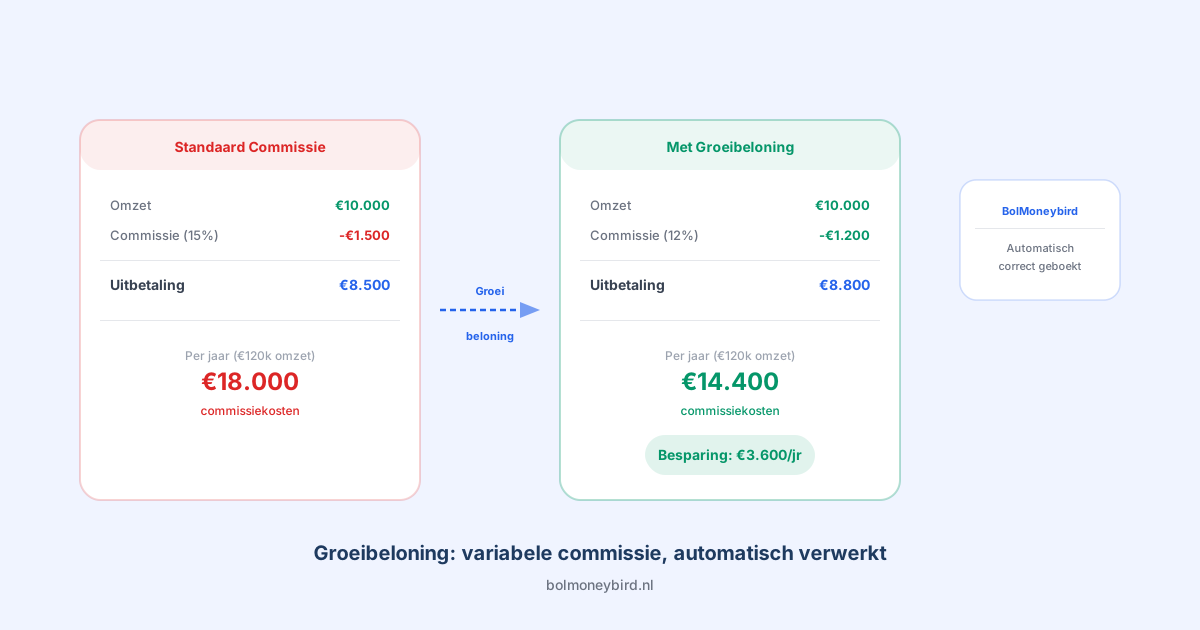
Bol.com recently announced the Groeibeloning (Growth Bonus), a new program launching on July 1, 2026. Selected partners can earn discounts on the commission they pay to the platform. Great news for your margins, but it raises an important question: how do you correctly process variable commission rates in your accounting?
In this article, we explain what the Growth Bonus entails, how it affects your commission costs, and what steps you need to take to keep everything properly recorded in Moneybird.
What Is the Bol.com Growth Bonus?
The Groeibeloning is Bol.com’s way of rewarding their best sellers. Sellers who meet certain quality standards and performance indicators qualify for a discount on their standard commission rate. The concept is straightforward: the better you perform as a partner, the less commission you pay.
This sounds attractive, and it is. But for your accounting, it means your commission percentage is no longer fixed. Where you could previously count on a set percentage per product category, that percentage can now vary from period to period based on your performance. This makes reconciling your Bol.com payouts with your bookkeeping considerably more complex.
Why Variable Commission Affects Your Bookkeeping
With a fixed commission rate, estimating and verifying your costs is relatively simple. You know that Bol.com deducts, say, 15% on every sale in a particular category, and you book that amount as an expense. With the Growth Bonus, that percentage becomes variable, which has several consequences.
First, it becomes harder to predict how much commission you will owe each month. You can no longer simply multiply your revenue by a fixed percentage. Second, when reconciling your Bol.com payouts in Moneybird, you need to pay extra attention to the actual amounts Bol.com withholds. A small difference in commission percentage can quickly add up to hundreds of euros at high volumes.
There is also a timing element. The Growth Bonus is calculated periodically based on your performance, meaning your commission rate can change from one period to the next. This makes your bookkeeping even more unpredictable if you are tracking things manually.
How to Book Commission Discounts in Moneybird
When you receive the Growth Bonus, the fundamental approach to booking commissions does not change. You still record the actual commission costs as a purchase invoice in Moneybird. The difference is in the amounts: they are now lower than the standard rate.
The best practice is to always use the actual commission that Bol.com deducts from your payout, not the standard percentage. For each payout, verify the exact amount Bol.com has withheld and book that precise figure. This prevents you from reporting too much or too little in expenses. For a detailed guide on booking commissions, read our article on booking commissions in Moneybird.
It is tempting to calculate using the discount percentage Bol.com has assigned to you, but in practice it is safer to use the actual figures per payout. Percentages can change mid-cycle, and small rounding differences accumulate over time.
Keeping Track of Changing Rates
When your commission rate can change every period, a structured approach becomes essential. There are a few practical steps you can take to maintain control over your bookkeeping.
Start by maintaining a record of your commission rates per period. Note when your Growth Bonus takes effect, what discount percentage you receive, and for which period it applies. This overview helps you verify your payouts and supports conversations with your bookkeeper or accountant.
Additionally, reconcile your payouts monthly with your bank account. Compare the amount Bol.com pays out with what you would expect based on your orders and the applicable commission rate. If the numbers do not match, there may be a rate change you have not yet processed.
Finally, consider labeling your commission costs separately in Moneybird. Use a clear category so that at the end of each quarter or year, you can immediately see how much total commission you have paid and how that relates to your revenue.
Automation Saves Time and Prevents Errors
Manually tracking variable commission rates is error-prone, especially when you process many orders. Checking each payout, calculating the correct amount, and manually entering it takes time you could spend growing your business.
With BolMoneybird, this process is fully automated. The integration pulls your actual commission costs directly from Bol.com and books them automatically in Moneybird, regardless of whether you pay the standard rate or benefit from the Growth Bonus. You do not need to adjust anything: the software always uses the actual amounts from your payout overview.
This is particularly valuable now that the Growth Bonus introduces variable rates. Where you might have previously managed with manual calculations based on fixed percentages, variable rates make that approach a recipe for mistakes. Automation ensures every euro is booked correctly, even when your rate changes mid-cycle.
Prepare for July 2026
The Growth Bonus takes effect on July 1, 2026, so you have some time to prepare. Use that time to review your current bookkeeping and ensure your commissions are already booked correctly. If your accounting is off now, variable rates will only make things harder.
Check that your Moneybird is properly set up for Bol.com and that your payouts have been reconciled accurately so far. Any issues you fix now are problems you will not have to troubleshoot once your commission rates start fluctuating.
Want to make sure your accounting is ready for the Growth Bonus? Try BolMoneybird for free and let the integration handle the heavy lifting, so you can focus on improving your performance as a Bol.com partner.
Tags
Share