Booking Bol.com Commissions in Moneybird: A Step-by-Step Guide
BolMoneybird Team
team@bolmoneybird.nl
Every Bol.com seller pays a commission to Bol.com for each product sold. This commission is one of your biggest cost items and needs to be accurately recorded in your accounting. Yet many sellers forget to book their Bol.com commissions in Moneybird, or they do it incorrectly. In this article, we explain step by step how to book commissions correctly, which mistakes to avoid, and how to automate the entire process.
How Do Bol.com Commissions Work?
Commission Rates by Category
Bol.com charges a commission percentage on the selling price (including VAT) of each product sold. The percentage varies by product category:
| Product Category | Commission (indicative) |
|---|---|
| Books | 10-13% |
| Electronics and computers | 8-12% |
| Clothing and fashion | 15-20% |
| Toys | 10-15% |
| Garden and DIY | 10-15% |
| Home and living | 12-18% |
| Food and beverages | 10-15% |
| Sports and leisure | 10-15% |
| Beauty and health | 12-18% |
| Baby and children | 10-15% |
| Pet supplies | 10-15% |
Note: these percentages are indicative. Bol.com regularly adjusts its commission structure. Check the Bol.com seller portal for current rates.
When Is Commission Charged?
Bol.com charges commission the moment an order is shipped. The commission is deducted from your payout. This means you never receive the full selling price — Bol.com withholds the commission directly.
How Do You Access the Overview?
Bol.com provides two ways to view your commissions:
- Per order: in the seller portal you can see the commission for each individual order
- Monthly invoice: each month you receive an invoice from Bol.com with a complete overview of all commissions
Why Booking Commissions Is Essential
Accurate Profit Calculation
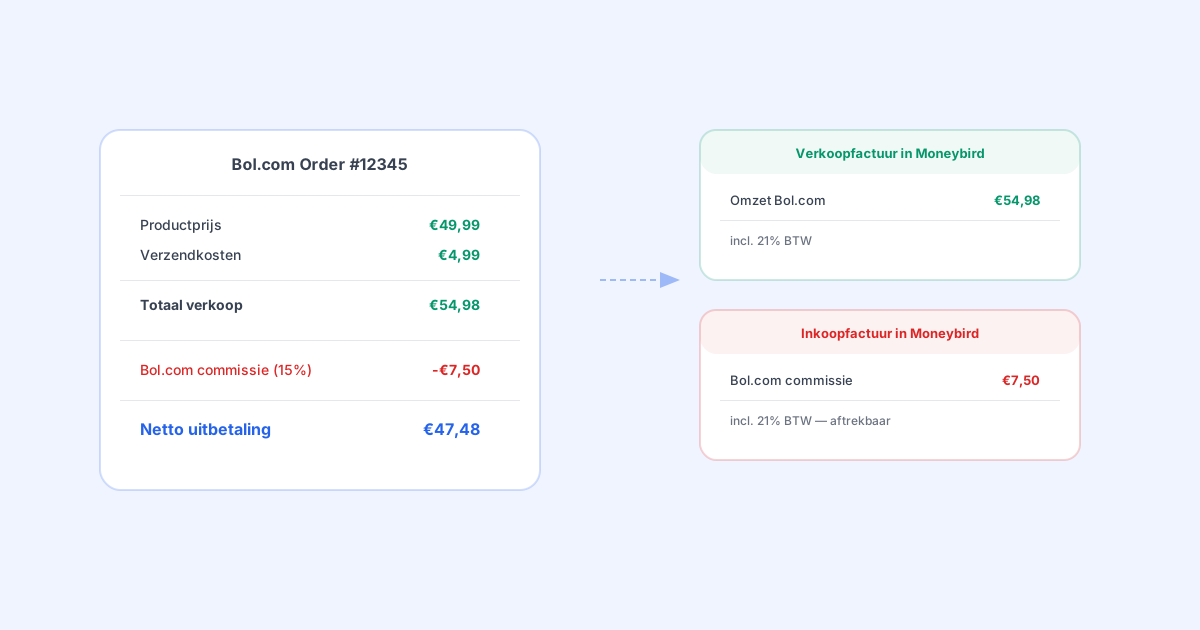
If you don’t book commissions as expenses, you overestimate your profit. Say you sell a product for 50 euros including VAT, with 15% commission:
- Selling price: EUR 50.00 incl. VAT
- Bol.com commission: EUR 7.50 incl. VAT (15%)
- Actual revenue: EUR 42.50
If you only record the selling price without the commission, your turnover appears higher than what you actually receive. Your profit margin is overstated.
Tax Benefit
Bol.com commissions are a business expense. By correctly booking them as a purchase invoice, you reduce your taxable profit and pay less corporate or income tax. On top of that, you can deduct the VAT on the commission as input tax.
Matching Your Bank Statement
Bol.com pays you after deducting commissions. If you only create sales invoices for the full amount but don’t book commissions as expenses, your accounting won’t match your bank statement. After all, the amount deposited is lower than the total of your sales invoices.
Manually Booking Commissions in Moneybird
Here is how to manually book Bol.com commissions in Moneybird:
Method 1: A Purchase Invoice Per Order
With this method, you create a purchase invoice for the commission on each order:
- Go to Purchases > Invoices > New invoice
- Select “Bol.com” as supplier (create this as a contact if you haven’t already)
- Add a line item:
- Description: “Sales commission order [order number]”
- Amount: the commission amount excluding VAT
- VAT rate: 21% (Bol.com commissions fall under the standard rate)
- Ledger account: “Bol.com sales commission” (or a similar expense account)
- Save the invoice
Advantage: you have per-order insight into commission costs. Disadvantage: with many orders, this is extremely time-consuming.
Method 2: Monthly Based on the Bol.com Invoice
With this method, you process commissions once a month:
- Download the monthly invoice from Bol.com in the seller portal
- Also download the CSV specification for the details
- Create a purchase invoice in Moneybird with Bol.com as the supplier
- Add lines for:
- Total sales commissions
- Any FBB costs (fulfillment costs, storage costs)
- Other costs
- Upload the PDF of the Bol.com invoice as an attachment
- Save the invoice
Advantage: you only need to do this once a month. Disadvantage: you have no up-to-date insight into your commission costs during the month, and it is an error-prone process.
Setting Up a Ledger Account
In Moneybird, create a separate expense account for Bol.com commissions:
- Go to Settings > Ledger accounts
- Click “New ledger account”
- Name: “Bol.com sales commission”
- Type: Expenses
- Category: Cost of sales or Purchase costs
- Save
Use this account consistently for all commission bookings. This way you can see at a glance how much you spend on commissions per month, quarter, or year.
Automatically Booking Commissions with BolMoneybird
BolMoneybird automates commission booking on two levels:
Level 1: Commission Per Order
For every synchronized order, BolMoneybird automatically calculates the commission and creates a corresponding purchase invoice in Moneybird. The invoice contains:
- The supplier: Bol.com
- The order number as a reference
- The commission amount with the correct VAT rate
- The appropriate ledger account
This gives you per-order insight into commission costs, without any effort on your part.
Level 2: Monthly Bol.com Invoices
BolMoneybird also automatically imports the monthly Bol.com invoices:
- Automatic detection: BolMoneybird detects when a new Bol.com invoice is available
- CSV processing: The detailed CSV specification is downloaded and processed
- Purchase invoice: A purchase invoice is created in Moneybird with all line items correctly categorized:
- Sales commissions by category
- Fulfillment costs (if you use FBB)
- Storage costs
- Shipping costs
- Other costs
- PDF upload: The original Bol.com invoice PDF is attached to the purchase invoice
This is a unique feature of BolMoneybird that you won’t find with other integrations. It saves you 30-60 minutes of manual work every month and prevents errors.
VAT on Bol.com Commissions
A frequently asked question: what VAT rate applies to Bol.com commissions?
Domestic Commissions
Bol.com is a Dutch company. The commission they charge is subject to 21% VAT (the standard Dutch rate). This applies regardless of the VAT rate on the product you sell.
So even if you sell a book (9% VAT), the commission Bol.com charges is taxed at 21% VAT.
VAT Deduction
You can deduct the VAT on Bol.com commissions as input tax on your VAT return. This is a significant advantage: you effectively only pay the net amount of the commission.
Example:
- Bol.com commission including VAT: EUR 7.50
- VAT (21%): EUR 1.30
- Commission excluding VAT: EUR 6.20
- After VAT deduction, the commission effectively costs you: EUR 6.20
Common Mistakes When Booking Commissions
Mistake 1: Not Booking Commissions at All
The most common mistake. If you don’t book commissions as expenses, your profit is overstated and your accounting won’t match your bank statement.
Mistake 2: Subtracting Commissions from Revenue
Some sellers book revenue net (after deducting commission). This is accounting-wise incorrect. You should book the gross revenue as a sales invoice and the commission as a separate purchase invoice. This gives you clean revenue and expense figures.
Mistake 3: Wrong VAT Rate
The commission is always subject to 21% VAT, regardless of the product’s VAT rate. Some sellers mistakenly apply the product’s VAT rate to the commission.
Mistake 4: Booking Too Late
If you only book commissions at the end of the year, you won’t have an accurate picture of your actual profit throughout the year. Book commissions monthly or — better yet — per order.
Analyzing Commissions: Know Your Costs
By properly booking your commissions, you can also analyze them. Key insights:
- Commission costs per month: how much do you pay Bol.com in total per month?
- Commission as a percentage of revenue: what is your effective commission rate?
- Commission per product category: which categories have the highest commission?
- Commission trends: are your commission costs rising or falling over time?
In Moneybird, you can run these analyses by filtering on the “Bol.com sales commission” ledger account and reviewing the figures by period.
Conclusion
Correctly booking Bol.com commissions in Moneybird is essential for accurate profit calculation, tax filing, and matching your bank statement. Doing it manually is a time-consuming process that is prone to errors. BolMoneybird automates the entire process: from commissions per order to the monthly Bol.com invoice with PDF upload. This way you always have up-to-date insight into your actual costs and can make informed decisions about your product range and pricing strategy. Get started with BolMoneybird and take the manual work out of your commission accounting.
Tags
Share