Why Real-Time Sync Is Crucial for Your Bol.com Bookkeeping
BolMoneybird Team
team@bolmoneybird.nl
In the world of e-commerce accounting, there is a fundamental difference between solutions that synchronize once a day and solutions that work in near real-time. For Bol.com sellers who are serious about their bookkeeping, this difference matters more than you might think. In this article, we explain why real-time synchronization is crucial for your Bol.com bookkeeping and what the concrete advantages are compared to daily batch processing.
What Do We Mean by Real-Time Synchronization?
Let’s first clarify the terms:
Daily Batch Synchronization
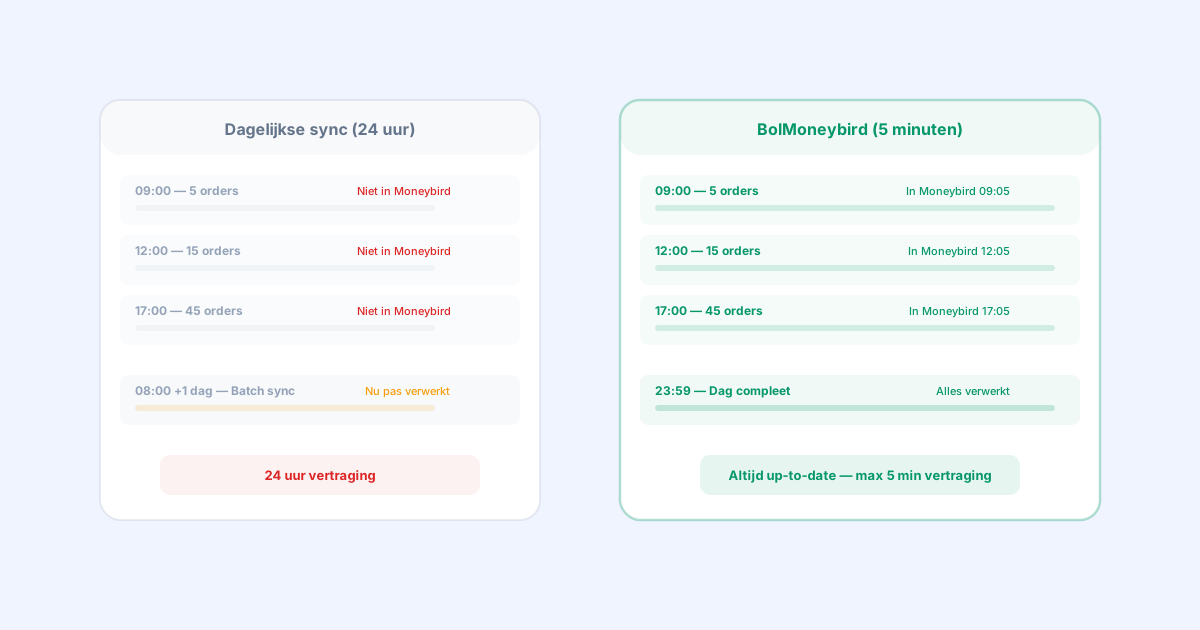
Most accounting integrations on the market use batch synchronization. This means all orders from the past 24 hours are processed in one go — usually overnight or early in the morning. If an order comes in at 10:00 AM, it won’t appear in your accounting until the next morning.
Near-Real-Time Synchronization
BolMoneybird synchronizes every 5 minutes. Technically speaking, this isn’t “real-time” (that would be milliseconds), but in practice the difference is negligible. An order that comes in at 10:00 AM will be in your Moneybird administration by 10:05 AM at the latest. We call this near-real-time or simply real-time synchronization.
The 7 Benefits of Real-Time Synchronization
1. Always Up-to-Date Financial Insight
The most important benefit of real-time synchronization is that your accounting is always an accurate reflection of your actual financial situation.
With daily sync: if you check Moneybird at 3:00 PM, all of today’s orders are missing. Your revenue, profit, and cash flow overviews are at least a day old. This is like driving a car by only looking in the rear-view mirror.
With real-time sync: you see current revenue, costs, and profit at any moment. On Tuesday at 4:00 PM, you can see exactly how much you’ve sold that day, what the commission costs are, and what you’re earning net. This gives you the information you need to make quick, well-founded decisions.
2. Spot Errors Faster
You want to catch bookkeeping errors as quickly as possible. The longer an error goes unnoticed, the harder it is to find the cause and make the correction.
With daily sync: if something went wrong yesterday — for example, a wrong VAT rate or a missing invoice — you won’t notice until today. Then you have to go back in time to figure out what exactly went wrong. With many orders, that’s like searching for a needle in a haystack.
With real-time sync: you can spot errors almost immediately. If something goes wrong with a synchronization, you’ll see it within 5 minutes and can take action right away. BolMoneybird also shows warnings directly in the dashboard if there’s a synchronization issue.
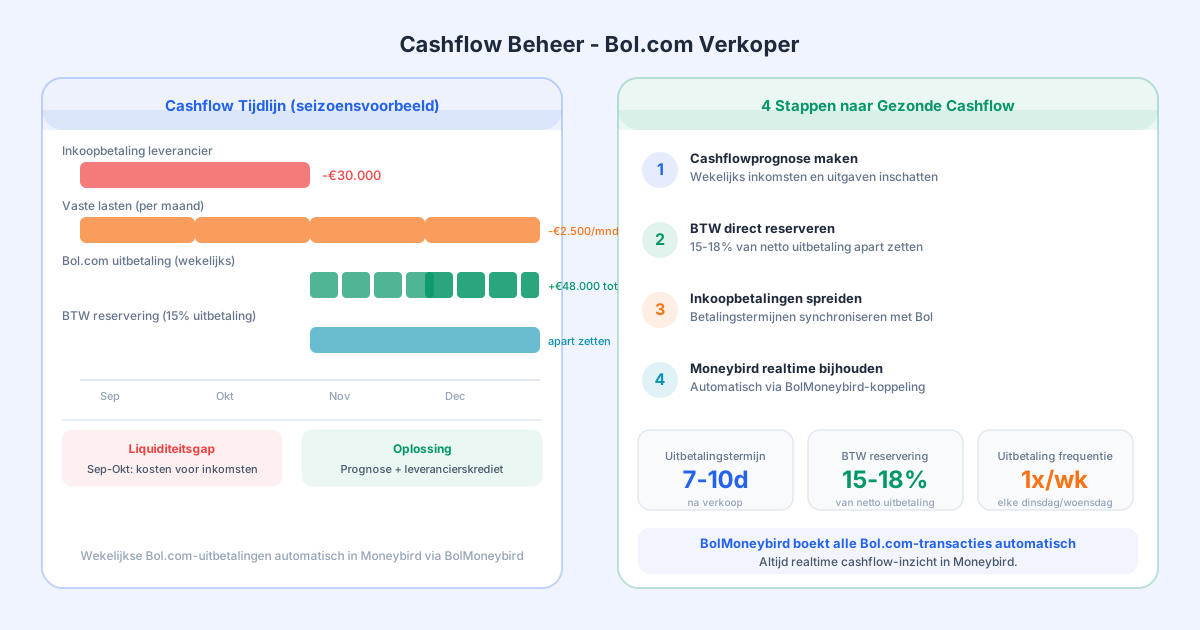
3. Better Cash Flow Insight
Cash flow — the flow of money in and out of your business — is one of the most important indicators of your company’s health. An up-to-date picture of your cash flow is essential for:
- Knowing whether you have sufficient liquidity
- Planning payments to suppliers
- Making investment decisions
- Recognizing seasonal patterns
With daily sync: your cash flow overview is always at least a day behind. During busy periods (holidays, Black Friday), this can mean you’re missing thousands of euros in income and expenses from your overview.
With real-time sync: your cash flow is always up-to-date. You know exactly how much is coming in today and how much is going out. This is especially valuable for sellers with thin margins or seasonal sales.
4. Simpler Month-End Closing
At the end of each month (and each quarter), you need to close your books for the VAT return and any reporting.
With daily sync: at the end of the month, you have to wait for the last batch to synchronize. You have to check whether all orders from the last day(s) have been processed. If orders are missing, you need to look them up manually and add them. The month-end close becomes a stressful process.
With real-time sync: on the last day of the month, your accounting is already virtually complete. You only need to wait for the very last orders (5 minutes at most). The month-end close becomes a breeze instead of a multi-hour task.
5. Better Customer Service
Sometimes a customer has a question about an invoice or a return. With real-time synchronization, you can respond immediately.
With daily sync: the customer calls at 11:00 AM about an order placed this morning, but the invoice isn’t in your system yet. You have to manually search the Bol.com portal for the order details.
With real-time sync: the invoice is already in Moneybird. You can immediately look up the invoice, check the status, and help the customer. Professional and efficient.
6. Less Chance of Missed Orders
With daily batch synchronization, there is always a risk of missing orders. This can happen due to:
- Technical failures during the batch window
- API limits being exceeded with large volumes
- Timezone issues at the daily cutoff
- Orders that fall right between two batches
With real-time sync: BolMoneybird checks every 5 minutes. If a synchronization fails, the next attempt happens 5 minutes later. The chance that an order is permanently missed is virtually zero. Additionally, BolMoneybird tracks which orders have already been synchronized, preventing duplicates.
7. Scalable as You Grow
As you sell more, real-time synchronization becomes increasingly important.
With daily sync at 500+ orders/day: the nightly batch has to create hundreds of invoices at once. This can take a long time, be error-prone, and the chance of missed orders increases. If the batch fails, you have to manually catch up an entire day.
With real-time sync at 500+ orders/day: orders are processed throughout the day, in 5-minute intervals. Each batch contains only a few orders, making processing fast and reliable. If a single synchronization fails, at most a handful of orders are processed 5 minutes later.
The Technology Behind BolMoneybird’s 5-Minute Sync
How does BolMoneybird manage to synchronize every 5 minutes without overloading the Bol.com API?
Intelligent Polling
BolMoneybird uses the Bol.com Retailer API v10 to check every 5 minutes for new events:
- New orders with “shipped” status
- New returns
- Status changes on existing orders
- New invoices
The system only requests changes since the last synchronization, keeping data traffic to a minimum.
Incremental Processing
Instead of reprocessing all orders, BolMoneybird tracks what has already been synchronized. Only new and changed orders are processed. This makes synchronization fast and efficient, even with large numbers of orders.
Error Handling and Retry
If a synchronization fails (for example, due to a temporary API outage), the failed processing is automatically retried at the next synchronization round. Critical errors are reported via the dashboard and optionally by email, so you always know what’s happening.
Rate Limiting
BolMoneybird respects the API limits of both Bol.com and Moneybird. The system intelligently distributes requests across available capacity, ensuring limits are never exceeded.
Real-Time Sync vs Daily Sync: A Practical Example
Let’s look at a concrete example. Say you sell an average of 50 orders per day.
Scenario: Daily Sync
| Time | Event | Accounting Status |
|---|---|---|
| 08:00 | Batch sync runs | Yesterday’s orders are processed |
| 09:00 | 5 new orders | Not in Moneybird |
| 12:00 | 15 orders, 2 returns | Not in Moneybird |
| 17:00 | 45 orders, 5 returns | Not in Moneybird |
| 23:59 | 50 orders, 8 returns | Not in Moneybird |
| 08:00 +1 day | Batch sync runs | Now all 50 orders are processed |
Your accounting always runs 24 hours behind. At any point during the day, today’s orders are missing.
Scenario: Real-Time Sync (BolMoneybird)
| Time | Event | Accounting Status |
|---|---|---|
| 09:00 | 5 new orders | In Moneybird by 09:05 |
| 09:15 | 1 return | Credit invoice by 09:20 |
| 12:00 | 15 orders, 2 returns | All processed, max 5 min delay |
| 17:00 | 45 orders, 5 returns | All processed |
| 23:59 | 50 orders, 8 returns | All processed, accounting is complete |
Your accounting is current throughout the day. At any moment, it reflects the actual situation.
What Does This Mean for Your VAT Return?
For the quarterly VAT return, you need to report your revenue and the VAT due. With real-time synchronization, this process is much simpler:
- You don’t have to wait for the last batch to process
- All orders, returns, and credit invoices are already correctly booked
- VAT is accurately calculated per invoice
- You can file your return immediately after the quarter closes
With daily sync, you have to wait after the quarter closes for the last batch, verify everything is complete, and potentially make manual updates. This costs extra time and creates stress.
Is Real-Time Sync More Expensive?
A frequently asked question: does real-time synchronization cost more than daily sync?
At BolMoneybird, 5-minute sync is available in the Pro plan. The Starter plan offers synchronization every 15 minutes. Both are significantly faster than the 24-hour sync of most competitors.
The additional cost of the Pro plan is easily offset by:
- Time savings on month-end closing
- Fewer errors that need correcting
- Better financial insight that leads to better decisions
- Less stress around the VAT return
Conclusion
Real-time synchronization is not a luxury — it is a necessity for Bol.com sellers who are serious about their bookkeeping. The benefits are clear: always up-to-date financial insight, faster error detection, better cash flow overview, simpler month-end closing, and scalability as you grow. BolMoneybird offers the fastest Bol.com-Moneybird integration on the market with its 5-minute sync. Combined with automatic VAT mapping, return processing, and invoice import, you have a complete solution that keeps your accounting up-to-date at all times. Try BolMoneybird and experience the difference that real-time synchronization makes.
Tags
Share