FBB (Fulfillment by Bol.com) Accounting: The Complete Guide
BolMoneybird Team
team@bolmoneybird.nl
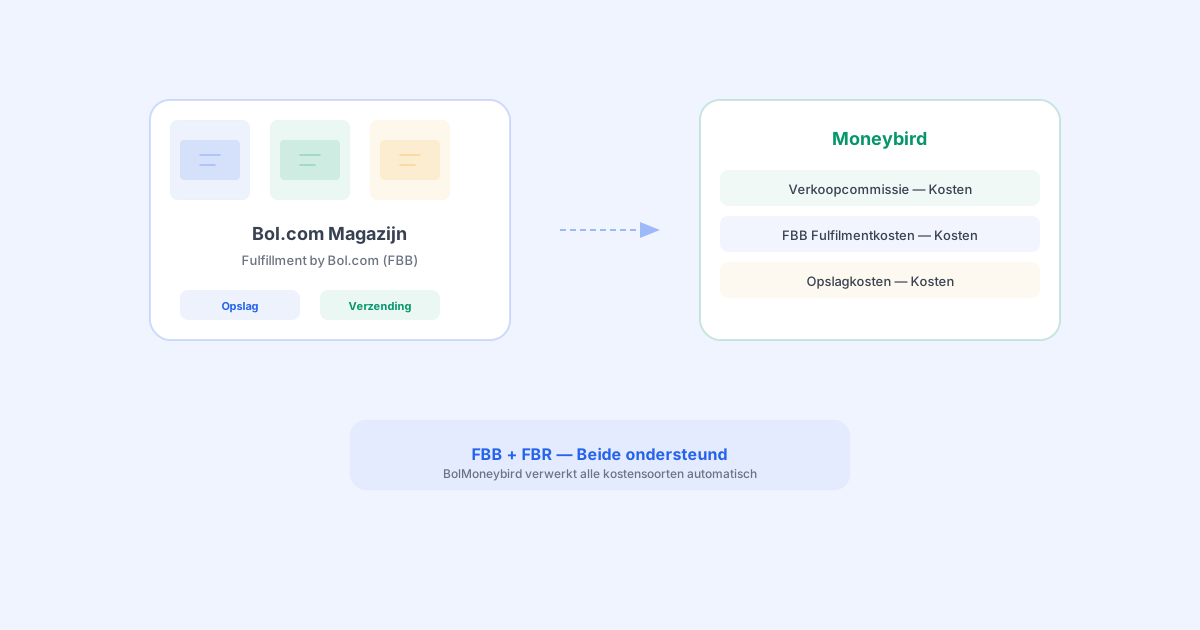
More and more Bol.com sellers are using FBB — Fulfillment by Bol.com. With this model, Bol.com stores your products in their warehouse and handles the entire process: storage, packaging, shipping, and return handling. It saves you a tremendous amount of work, but it also brings additional costs that need to be correctly recorded in your accounting. In this complete guide, we explain how FBB accounting works and how to record everything correctly in Moneybird.
FBB vs FBR: What Is the Difference?
Bol.com offers two fulfillment models:
FBR — Fulfillment by Retailer
With FBR (also called “Own shipping”), you handle everything yourself:
- You store products in your own warehouse or at home
- You pack orders yourself
- You arrange shipping through your own carrier (PostNL, DHL, etc.)
- You handle returns yourself
Your costs are limited to the Bol.com sales commission and your own shipping and storage expenses.
FBB — Fulfillment by Bol.com
With FBB, you outsource logistics entirely to Bol.com:
- Bol.com stores your products in their fulfillment centers
- Bol.com packs and ships orders to customers
- Bol.com handles returns
- Customers see the “Shipped by bol.com” badge
The costs are higher than with FBR because you pay for storage, handling, and shipping by Bol.com.
What Additional Costs Does FBB Involve?
With FBB, you deal with multiple cost categories that all need to be correctly recorded in your accounting:
1. Sales Commission
Just like with FBR, you pay a sales commission per product sold. This percentage varies by product category:
- Books: 10-15%
- Electronics: 8-12%
- Clothing: 15-20%
- Toys: 10-15%
- Household: 10-15%
2. FBB Fulfillment Costs
These are the costs Bol.com charges for handling your orders. They consist of:
Handling costs per order: a fixed amount per shipped package. This covers picking, packing, and preparing for shipment.
Shipping costs: based on the weight and dimensions of the package. Bol.com uses tiered pricing based on weight.
| Package weight | Cost (indicative) |
|---|---|
| Up to 1 kg | approx. €3.00 |
| 1-5 kg | approx. €3.50 |
| 5-10 kg | approx. €4.50 |
| 10-20 kg | approx. €6.00 |
| 20+ kg | on request |
Note: these rates are indicative and subject to change. Check the Bol.com seller portal for current pricing.
3. Storage Costs
Bol.com charges monthly storage fees per cubic meter your products occupy in the warehouse. The costs depend on:
- The volume of your products
- The duration products have been stored (longer storage = higher cost per m3)
- The season (higher costs during peak periods such as Q4)
4. Return Handling Costs
With FBB, Bol.com handles returns. There are also costs associated with this, depending on whether the product is resaleable or not.
5. Labeling and Preparation Costs
If you deliver products to the Bol.com warehouse without proper labeling, Bol.com charges fees for (re)labeling your products.
How Do You Record FBB Costs in Moneybird?
Now that we have a clear overview of the costs, let us look at how to record them correctly in Moneybird.
Setting Up Ledger Accounts
For a well-organized FBB accounting setup, we recommend creating the following ledger accounts in Moneybird:
| Ledger account | Category | Purpose |
|---|---|---|
| Bol.com sales revenue | Revenue | Sales proceeds |
| Shipping revenue | Revenue | Shipping costs charged to customer |
| Bol.com sales commission | Expenses | Commission costs per sale |
| FBB fulfillment costs | Expenses | Handling and shipping costs FBB |
| FBB storage costs | Expenses | Monthly storage fees |
| FBB return costs | Expenses | Return handling costs |
Recording Sales Invoices
For each sale, you create a sales invoice with:
- The product revenue on the “Bol.com sales revenue” ledger account
- The shipping costs (charged to the customer) on “Shipping revenue”
- The correct VAT rate per line item
Recording Commissions and Fulfillment Costs
Bol.com commissions and FBB costs are recorded as purchase invoices:
- The sales commission on “Bol.com sales commission”
- The fulfillment costs on “FBB fulfillment costs”
Recording Monthly Storage Costs
Bol.com charges storage costs monthly through the monthly invoice. You record these as a purchase invoice on the “FBB storage costs” ledger account.
The Monthly Bol.com FBB Invoice
Each month, you receive a detailed invoice from Bol.com with an overview of all costs. This invoice includes:
- Sales commissions: specified per product category
- Fulfillment costs: handling and shipping per order
- Storage costs: per cubic meter per month
- Return handling costs: per returned product
- Other costs: labeling, preparation, etc.
- Amount to be paid out: the net amount Bol.com pays to you
It is crucial that this invoice is correctly processed in your accounting, with all cost categories assigned to the right ledger accounts.
Manual vs Automatic: The Differences for FBB
Manual Processing
With manual processing, you need to do the following every month:
- Download the Bol.com monthly invoice from the seller portal
- Download the CSV specification for the details
- Manually enter all cost lines into Moneybird
- Assign costs to the correct ledger accounts
- Calculate VAT correctly (Bol.com invoices exclude VAT)
- Upload the PDF as an attachment
This takes an average of 30-60 minutes per month, depending on the number of line items. And the chance of errors is significant.
Automatic Processing with BolMoneybird
BolMoneybird automates the entire process:
- Automatic detection: BolMoneybird detects when a new Bol.com invoice is available
- CSV import: The detailed CSV specification is automatically downloaded and processed
- Purchase invoice creation: A purchase invoice is created in Moneybird with all lines correctly distributed across the appropriate ledger accounts
- VAT calculation: VAT is automatically calculated correctly
- PDF upload: The original Bol.com invoice PDF is added as an attachment to the purchase invoice
Using FBR and FBB Side by Side
Many sellers use both FBR and FBB — they ship some products themselves while having Bol.com handle others. BolMoneybird automatically recognizes whether an order was fulfilled via FBR or FBB and adjusts the entries accordingly:
- FBR orders: only the sales commission recorded as an expense
- FBB orders: sales commission plus fulfillment costs recorded as expenses
Tips for Efficient FBB Accounting
1. Track Costs Per Product
By analyzing your FBB costs per product, you can determine which products are profitable and which are not. Products with low margins and high FBB costs might be better off as FBR products.
2. Watch Out for Long-Term Storage Costs
Bol.com charges higher storage fees for products that have been in the warehouse for more than 6 months. Keep your inventory management tight and avoid unnecessarily high storage costs.
3. Review Your Monthly Invoice
Even with automation, it is wise to review your Bol.com invoice monthly. Check whether the amounts match your expectations and whether there are any unusual charges.
4. Separate FBR and FBB Costs
Use separate ledger accounts for FBR and FBB costs. This way, you can see exactly what each fulfillment model costs you and make a well-informed decision.
5. Automate Your Accounting
Manually tracking FBB costs is time-consuming and error-prone. Use BolMoneybird to automate the entire process. This way, you can be sure that all costs are recorded correctly and on time.
Conclusion
FBB (Fulfillment by Bol.com) offers enormous advantages in terms of logistics, but it also adds complexity to your accounting. The additional costs for fulfillment, storage, and return handling all need to be recorded correctly. With BolMoneybird, you automate this entire process: from sales invoices and commissions to the monthly FBB invoices with all the details. This way, you can focus on what truly matters — selling your products and growing your business. Get started with BolMoneybird today and take the complexity out of your FBB accounting.
Tags
Share