Processing Bol.com Credit Notes and Corrections in Moneybird
BolMoneybird Team
team@bolmoneybird.nl
As a Bol.com seller, you will occasionally see unfamiliar entries in your payouts: corrections, reversals, or credit notes. These are adjustments Bol.com makes to a previously processed transaction. For everyday sales it is straightforward: revenue in, commission deducted, payout complete. But with corrections, it takes a bit of thought to figure out how to record them correctly in Moneybird.
This article explains what types of corrections you might encounter, why they cannot be ignored in your bookkeeping, and how to process each type step by step.
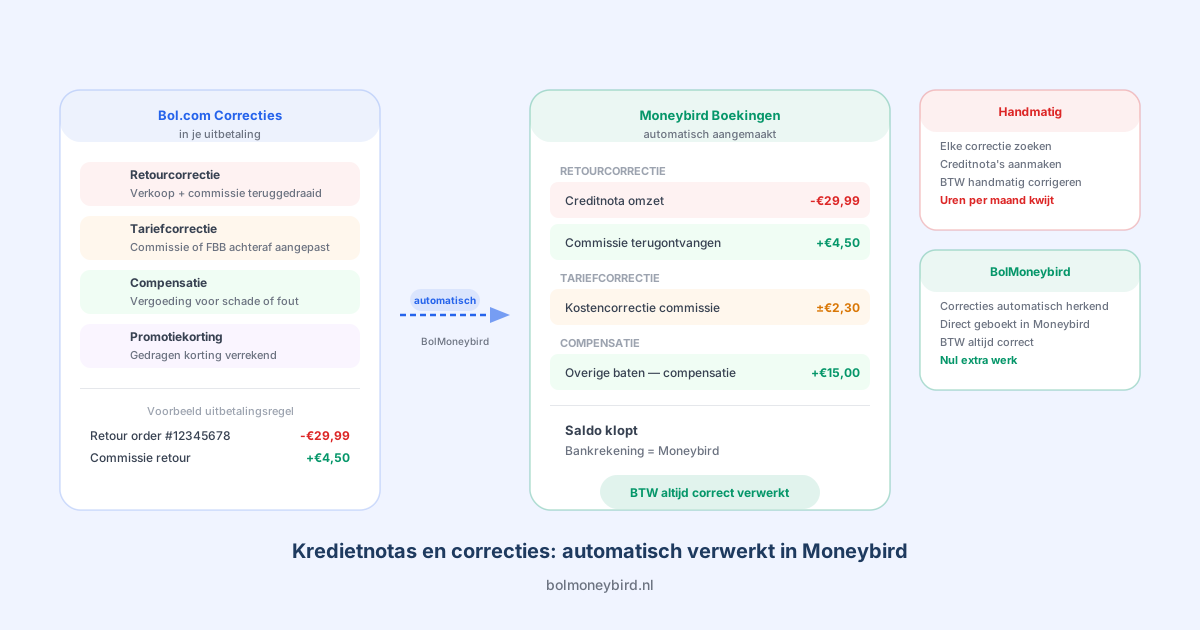
What kinds of corrections does Bol.com issue?
Bol.com can process corrections in your payout for a range of reasons. The most common are:
1. Return corrections
When a customer returns an order, Bol.com reverses the associated payout. This means the sales revenue you received is deducted again. At the same time, the commission that was withheld is also corrected, because you paid commission on a sale that ultimately did not go through.
2. Rate corrections
Sometimes Bol.com adjusts a rate after the fact. This can apply to commissions, FBB costs, or other platform fees. You then receive a correction entry that adjusts the earlier amount to the correct rate.
3. Damage claims and compensations
If Bol.com damages your products in their warehouse (with FBB), you receive compensation. This is a positive correction to your payout. Conversely, Bol.com can also reclaim amounts if an earlier payout contained an error.
4. Promotion discounts
When you participate in a Bol.com promotion where you bear the discount, Bol.com processes the corresponding adjustment in your payout. Read our article on booking Bol.com promotions in Moneybird for more details.
Why corrections must not be ignored in your bookkeeping
It can be tempting to skip small corrections, especially when amounts are only a few euros. But this causes problems:
Your payouts will not reconcile. When you match your bank account against Moneybird and unbooked corrections are present, the balances will not match. That costs you extra time each month tracking down the difference.
Your VAT return goes out of balance. Corrections can have VAT implications. A reversed sale means the VAT you previously paid over also comes back. If you do not book this, you are overpaying VAT.
Your profit figures become inaccurate. Corrections are either costs or revenues. They belong in your bookkeeping, not in the bin.
How to book a correction in Moneybird
The approach differs per correction type:
Booking a return correction
A return is essentially reversing two things: the sales invoice and the associated commission. In Moneybird, you create:
- A credit note on the original sales invoice for the sales amount
- A correction entry on the commission cost invoice for the commission that was returned
Link the credit note to the original invoice so your administration stays cleanly closed. For more on booking returns in general, see our article on booking returns in Moneybird.
Booking a rate correction
Book a rate correction as an adjustment to the original cost invoice. If the correction is small (a few cents), you can record it as a separate cost entry under the same category. For larger amounts, it is better to adjust the original invoice or create a credit note and a new invoice at the correct amount.
Booking a compensation from Bol.com
If you receive compensation, this is a special revenue item. Create an invoice in Moneybird with the category “Other income” or a specific category for compensations. Do not forget to select the correct VAT rate, which is 21% unless you are exempt.
Recognising corrections in your payout
Bol.com shows corrections in your payout overview under the payment specification. Most corrections appear as a negative amount when they are reversals. A positive correction amount means Bol.com is returning something to you.
When reconciling your Bol.com payouts in Moneybird, go through them line by line. Every line in the payment specification must appear in your bookkeeping, including corrections.
How BolMoneybird processes corrections automatically
Manually tracking down and booking all corrections is time-consuming and error-prone. Especially if you have high volumes or many returns, this can cost you extra hours every month.
BolMoneybird processes all transactions from your Bol.com payout automatically in Moneybird, including corrections. The integration reads the full payment specification and translates every line, including return corrections and rate adjustments, into the correct entries in Moneybird. You do not need to look anything up or make manual adjustments yourself.
This is especially valuable with returns. Each return leads to two correction entries (revenue and commission), and if you track that manually for dozens of returns per month, the chance of errors is high. With BolMoneybird it happens automatically and always consistently.
Practical tip: review your corrections each quarter
Even with BolMoneybird, it is wise to check each quarter that all corrections have been processed correctly. Review your Moneybird categories and compare the totals with the payout overviews from Bol.com. A small spot check each quarter prevents minor discrepancies from accumulating into a bookkeeping problem at year end.
Never want to chase corrections manually again? Try BolMoneybird for free and let the integration process every transaction type automatically, including all corrections and reversals.
Tags
Share