Processing Purchase Invoices in Moneybird: A Guide for Bol.com Sellers
BolMoneybird Team
team@bolmoneybird.nl
Your Bol.com sales are growing, orders are coming in steadily, and meanwhile supplier invoices are piling up in your inbox. Every invoice represents a cost that must be correctly recorded in Moneybird if you want an accurate financial picture and maximum VAT deduction. Yet for many Bol.com sellers, purchase administration is the part of bookkeeping that gets pushed back the longest. In this article we walk you through how to correctly process purchase invoices in Moneybird and connect them to your Bol.com revenue.
Why processing purchase invoices promptly pays off
It is tempting to set purchase invoices aside for “later”, but that backfires. Three concrete reasons to process them immediately:
Your VAT benefit does not disappear, but you forget to claim it. The VAT your supplier charges is deductible as input tax. If you post invoices too late, you miss the VAT deduction in the quarter to which it relates. You can sometimes correct this in a later quarter, but it costs time and effort.
Your profit margin becomes unreliable. If you track your revenue but not your purchase costs, your profit and loss account gives a distorted picture. You think you are earning more than you actually are, which can lead to unpleasant surprises at tax time.
Cash flow overview is inaccurate. Moneybird provides an accurate cash flow overview, but only if all invoices are recorded. Outstanding supplier invoices that are not booked are invisible liabilities.
Step 1: Receive and organise purchase invoices
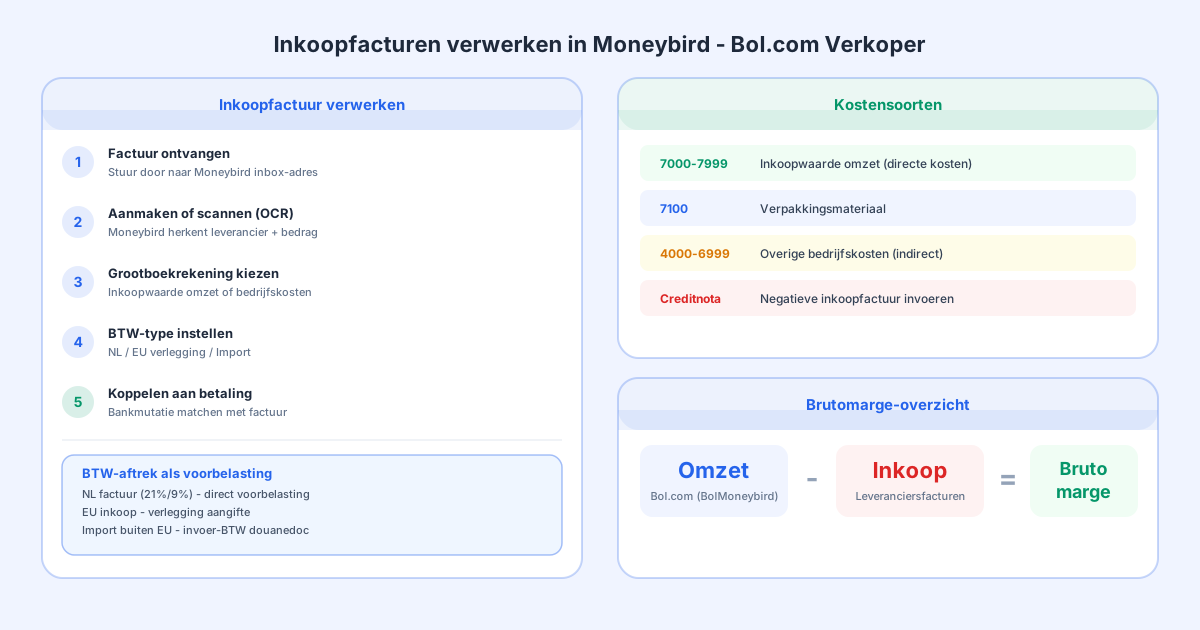
Build a fixed routine for receiving purchase invoices. Most suppliers send invoices by email. Moneybird lets you create a unique inbox email address (via Settings > Purchase invoices). Invoices you send or forward to this address are automatically read in and queued for processing.
If you receive invoices in other formats, for example physical invoices or PDF attachments spread across multiple emails, scan everything immediately and upload it in Moneybird. Also keep the original documents, digital or physical, for the legally required retention period of seven years.
Step 2: Create or import the purchase invoice
In Moneybird, go to Purchases > Purchase invoices and click “New purchase invoice”. You have two options:
Manual entry: Enter the contact name (supplier), the invoice date, the supplier’s invoice number, and the invoice lines with amount and VAT rate. This works well for suppliers from whom you receive invoices monthly or occasionally.
Scan and recognise (OCR): Upload the PDF or photo of the invoice. Moneybird automatically recognises the supplier, amount, and VAT amount and fills in the fields for you. Always verify the populated data; OCR is accurate but not infallible.
Step 3: Choose the correct general ledger account
This is the step where most sellers hesitate. Which general ledger account do you use for purchase costs? It depends on what you are buying:
Direct purchase costs (cost of goods sold): Products you sell on Bol.com are posted to a purchase cost account, often “Cost of sales” or “Purchase value of turnover” (ledger accounts in the 7000-7999 range). These are your variable costs that directly relate to your revenue.
Packaging materials: Boxes, filling material, and labels are also direct purchase costs if they go directly into your product packaging. Post them to the same purchase cost account or create a separate “Packaging materials” account.
Other business costs: Office supplies, software, insurance, business transport are indirect costs. Post these to the appropriate cost accounts in the 4000-6999 range.
Not sure which account to use? Consult your accountant or check the standard chart of accounts Moneybird provides. A solid one-time setup saves you hours of correction work later.
Step 4: Process VAT correctly
As a VAT-registered business, you may deduct the VAT on purchase invoices as input tax. Always verify that the supplier invoice contains a valid VAT number; without it, the VAT is not deductible.
Common VAT situations for Bol.com sellers:
Purchases within the Netherlands (21% or 9% VAT): Moneybird automatically registers the VAT as input tax. You can see this in your VAT return under “Input tax”.
Purchases from China or other non-EU countries: On import you pay import VAT to Customs or via a fiscal representative. This import VAT is deductible as input tax, but you must use the customs document (customs declaration) as the basis for the entry.
Purchases from EU countries (intra-community acquisition): If you buy goods from a VAT-registered supplier in another EU country, the reverse-charge mechanism applies. The supplier invoices without VAT, but you as the buyer must declare the VAT to the tax authority and can simultaneously reclaim it as input tax. In Moneybird you set this via the VAT type “Reverse charge EU”.
Step 5: Link the invoice to the payment
After you enter a purchase invoice, it appears as “To be paid” in Moneybird. Once you have paid the supplier, link the bank statement line to the invoice. This clears the outstanding item and keeps your creditor administration accurate.
If you pay via iDEAL or bank transfer, bank transactions come in automatically if you have linked your bank to Moneybird. You then recognise the payment with a few clicks and link it to the correct invoice.
If you pay by credit card, there is an extra step: the credit card payment itself is the initial transaction, and you enter the credit card statements separately as a source. Many sellers prefer to create a separate ledger account for credit card payments to keep things clear.
Connecting purchase costs to your Bol.com revenue
Now that your purchase invoices are correctly recorded, you want to mirror them against your Bol.com revenue. How much did you purchase for the products you sold this month? This insight gives you the cost of goods sold and therefore your gross margin.
The challenge: Bol.com pays you weekly via a payment specification that bundles sales, commissions, return cost settlements, and other items. On the purchase side you have separate supplier invoices. To get an accurate margin picture, you need to connect both sides of the transaction.
BolMoneybird automates the sales side: Bol.com payouts are automatically split and posted in Moneybird. Combine that with correct purchase accounting and you always have an up-to-date view of your gross margin per period. Read more about how Bol.com payouts are processed in our article on reconciling Bol.com payouts in Moneybird.
Common mistakes in purchase administration
Forgetting credit notes. If you return products to a supplier or receive a discount afterwards, the supplier sends a credit note. Always enter this as a negative purchase invoice in Moneybird so that your creditor administration and VAT remain correct.
Confusing invoice date and payment date. In Moneybird you use the supplier’s invoice date, not the date on which you pay. This matters for the VAT period: the VAT deduction belongs to the quarter of the invoice date.
Mixing personal and business expenses. If you operate as a sole trader or general partnership, make sure you only post invoices for business costs. Mixing personal expenses with business ones will cause problems in your tax return.
Not keeping the original invoice. Without the original invoice document, the right to VAT deduction lapses in a tax audit. Always scan or save the original PDF file alongside the entry in Moneybird.
Automation as the next step
Do you process dozens or hundreds of purchase invoices per month? Then manual processing is no longer scalable. Moneybird offers an API that lets you automate invoice processing. You can also use integrations with purchasing platforms or ERP systems.
For the sales side of your Bol.com accounting, automation is even easier: BolMoneybird fetches your transactions from Bol.com daily and automatically posts them to Moneybird. You only need to keep track of supplier invoices, and the software handles the rest. Try BolMoneybird for free and see how much time you save.
Conclusion
Correct purchase administration is the foundation of reliable bookkeeping and maximum VAT deduction. By immediately processing purchase invoices in Moneybird on the correct ledger account, with the right VAT type, and linked to your bank payment, you always have a grip on your costs and margin. Combine this with BolMoneybird’s automatic Bol.com transaction processing and you have an accurate bookkeeping system without hours of manual work.
Tags
Share