How to Book Bol.com Advertising Costs in Moneybird
BolMoneybird Team
team@bolmoneybird.nl
If you sell on Bol.com, you are probably investing in Sponsored Products to increase the visibility of your listings in search results. Those advertising costs are deductible business expenses, but correctly processing them in your accounting is not always straightforward. In this article, we explain how to book Bol.com advertising costs in Moneybird, step by step.
How do Bol.com advertising costs work?
Bol.com charges advertising costs through a separate system, independent from your regular payouts. You set a daily budget and pay per click (CPC, cost-per-click). At the end of each month, Bol.com sends an invoice for the advertising costs incurred. Bol.com either deducts this invoice from your next payout, or collects it directly from the payment method you have set up in the partner platform.
This means that advertising costs can appear in two places in your accounting: as deductions on your payout, or as separate charges from your bank account. Which variant applies to you depends on your settings in the Bol.com partner platform.
Why book advertising costs separately?
Many sellers make the mistake of lumping advertising costs into a general “Bol.com costs” bucket. This is understandable, but it makes your accounting less insightful. By tracking advertising costs separately, you can immediately see:
- How much you spend on advertising per period
- What the ratio is between your advertising spend and your revenue (ACOS — advertising cost of sales)
- Whether your advertising budget is delivering a return or running too high
For your VAT return, it also matters whether Bol.com invoices you as a Dutch business entity (21% VAT) or as a service from outside the EU. Bol.com is a Dutch entity and charges VAT on advertising services, so you can generally reclaim this as input tax.
Step 1: Finding your advertising invoice
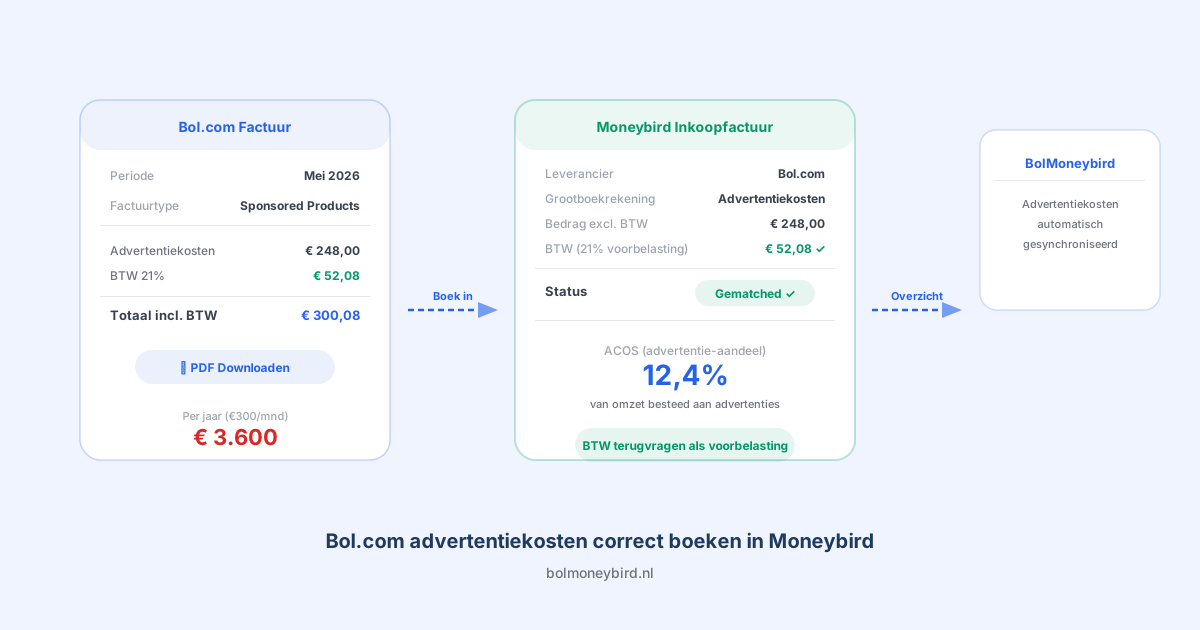
Log in to the Bol.com partner platform and go to Finance > Invoices. Here you will find all invoices for your advertising spend. Download the PDF invoice for the relevant month.
On the invoice, check the following:
- The total amount excluding VAT
- The VAT amount (21%)
- The period the costs relate to
- The Bol.com invoice number
Step 2: Creating a purchase invoice in Moneybird
Create a new purchase invoice in Moneybird. Use “Bol.com” as the supplier, or create a supplier if one does not yet exist. Enter the Bol.com invoice number as a reference, so you can always trace which invoice belongs to which entry later on.
Choose an appropriate ledger account such as “Marketing costs” or “Advertising costs”. If you do not yet have this category in Moneybird, create it under Settings > Ledger accounts. A dedicated ledger account for advertising costs will give you a clear view in your profit and loss statement later on.
Enter the amount excluding VAT and select 21% VAT. Moneybird will then automatically calculate the input tax you can reclaim in your VAT return.
Step 3: Linking to your bank account
Once the advertising costs have been debited from your bank account, or offset against your Bol.com payout, link the entry. If it is a direct debit from your bank account, link the bank mutation in Moneybird to the purchase invoice you created. Moneybird often recognises the amount and suggests the link automatically.
If advertising costs are deducted from your Bol.com payout, process them as part of your payout reconciliation. In that case, you will see a separate line for advertising costs on your Bol.com payment specification. Book this as a separate cost line in Moneybird to keep the breakdown clear. You can read more about reconciling payouts in our article on reconciling Bol.com payouts in Moneybird.
Step 4: Processing VAT correctly
Bol.com charges 21% VAT on advertising services. You can reclaim this as input tax in your VAT return, provided you are an entrepreneur and sell products or services subject to VAT. When creating the purchase invoice in Moneybird, always check that the VAT setting is correct. Moneybird usually gets this right automatically, but it is worth verifying.
If you also have foreign customers or sell products subject to the reduced VAT rate (9%), consult your accountant about the exact processing. For most sellers, 21% input tax is the straightforward case. Also read our article on preparing your VAT return as a Bol.com seller for more context.
Common mistakes when booking advertising costs
Not saving the invoice. The most common mistake is that sellers see the costs on their bank statement or payout, but do not download and keep the corresponding Bol.com invoice. Without an invoice, you miss the VAT deduction and risk issues during an audit. Save every invoice as a PDF and upload it in Moneybird.
Merging advertising costs with commissions. Although both are costs that Bol.com deducts, they are different types of expenses. Commissions are directly related to your revenue and variable per sale. Advertising costs are marketing expenses that you set yourself and are unrelated to individual orders. Keep them separate in your ledger.
Not reclaiming VAT. Some sellers forget that advertising invoices contain VAT that can be reclaimed. Especially if you advertise heavily, this can add up to a significant amount over a year. Process the VAT correctly for each invoice.
Automating your advertising cost tracking
If you advertise frequently or run multiple campaigns, manually tracking advertising costs each month can become time-consuming. BolMoneybird automates the synchronisation of your Bol.com financial data to Moneybird, including the processing of advertising-related costs that appear in your payment specifications. This means you no longer need to manually go through your invoices every month. Read more about the benefits in our article on real-time sync benefits.
Summary
Booking Bol.com advertising costs correctly in Moneybird takes a few steps: download the invoice, create a purchase invoice with the right ledger account, process the VAT, and link it to your bank account or payout. By keeping advertising costs separate from commissions and other cost types, you get a clear picture of your marketing spend and can make better decisions about your return on ad spend.
Have questions about processing your Bol.com accounting in Moneybird? Browse the other articles on our blog, or try BolMoneybird for free.
Tags
Share